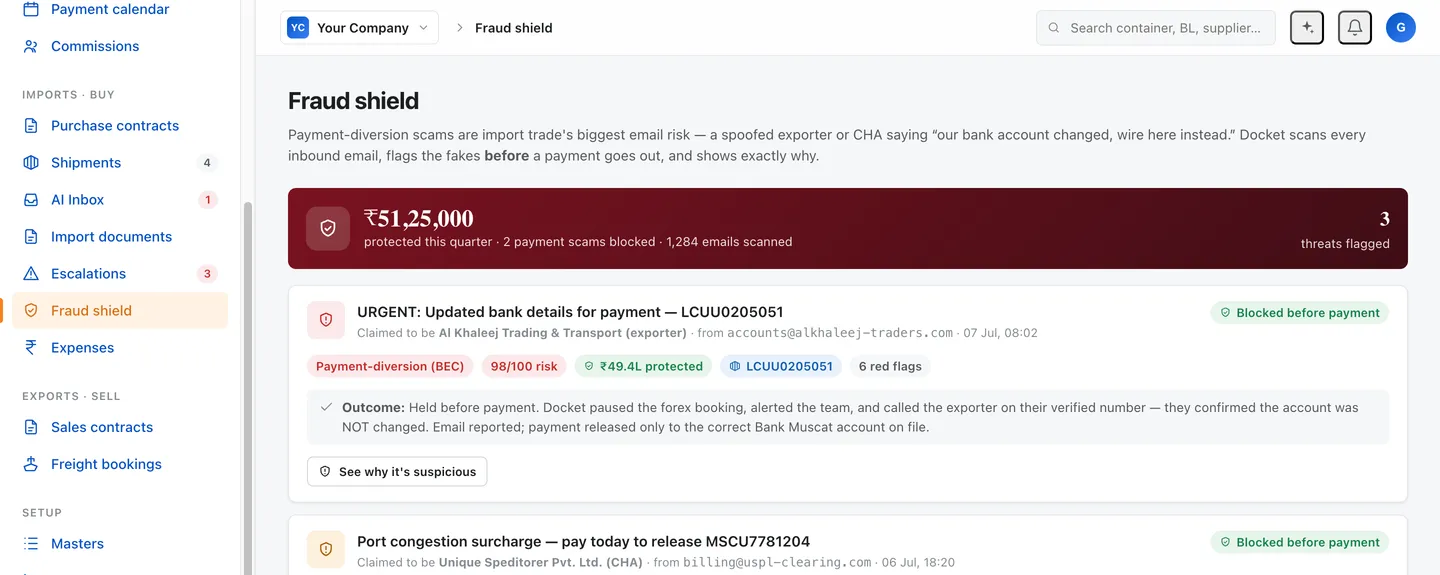
Trade fraud screening for payment-diversion attempts
Trade fraud screening software watches where the money gets stolen: your mailbox. Docket screens every inbound email against four payment-diversion signals, checks the instruction against the contract party and the account on file and holds the payment with the reason written out. One such attempt on a single shipment was worth US$62,500. It is not a bank control, and does not replace a callback.
Replaces: A written policy that bank details are never changed by email, enforced by whoever is reading the mail · Generic email security add-ons that score spam and phishing but do not know your contract party · A senior person eyeballing every payment instruction before release · Finding out at reconciliation
US$62,500 on one email. That is the size of a single payment-diversion attempt on one shipment — a message arriving from what looks like the exporter, asking for the balance to go to a different bank. Docket screens every inbound email against the signals that give that away, checks the instruction against the contract party and the account already on file, and holds the payment with the reason written out.
One incident is what we have. We are not going to multiply it by twelve and call it an annual saving.
Why is the mailbox where import money gets stolen?
Because the mailbox is where import trade runs.
Six to ten parties touch a single shipment: exporter, customs broker, bank, shipping line, forwarder, insurer, transporter. Payment instructions legitimately arrive by email from several of them. There is no portal. There is no single system of record. There is no one person whose job is to notice that this particular message is different from the last forty.
An attacker does not break in. They wait until a contract is agreed and an invoice is genuinely due, then send a plausible mail about a compliance audit or a temporary hold on the regular account. Everything in the message is true except the account number.
We wrote the mechanics up separately, because the definition and the product are two different jobs. If you want the anatomy of the scam, read the glossary entry on payment diversion fraud. This page is about what a screen on your desk does about it.
What does Docket screen for?
Four signals, checked on every inbound message.
- A look-alike sender domain. In the US$62,500 attempt the mail came from a domain registered six days earlier, one character different from the exporter’s real domain of many years.
- Bank details changed mid-deal. A new Hong Kong account for an exporter based in Oman, when the originals were already lodged with the bank against the Oman account.
- A beneficiary name that does not match the contract party. The money was requested for a company that was not the exporter named on the shipment.
- Urgency and secrecy language. Urgent, confidential, confirm today. Genuine banking changes are boring, documented, and never in a hurry.
The fifth check is the one a generic email filter cannot make. Docket already holds your purchase contract, your sales contract, your counterparty masters and the account you have paid before. So it compares the instruction in the mail against the instruction in the contract. A spam filter scores a message. Docket scores a message against your deal.
How does this compare to what a desk has now?
| Email security add-on | Policy and approval thresholds | A senior person reading every mail | Docket | |
|---|---|---|---|---|
| Knows your contract party | No | Yes, in a human head | Yes, in a human head | Yes, from the contract |
| Knows the account you paid last time | No | Sometimes | Sometimes | Yes |
| Runs on every inbound mail | Yes | No | Not by Friday evening | Yes |
| Explains why it flagged | Generic warning | Not applicable | Yes | Yes, with the signal named |
| Holds the payment inside your process | No | Yes, if followed | Yes, if they are at the desk | Yes |
| Survives a busy week | Yes | Rarely | No | Yes |
The row that matters is the second one. Most tools that claim to stop invoice fraud have never read your contract, so the only thing they can measure is whether the mail looks like spam. This mail does not look like spam. It looks like your supplier.
What Docket does not do, stated plainly
This is the page where overclaiming would cost the most, so here is the boundary.
Docket screens email. It is not a bank control. It does not sit on your payment rails, does not hold banking credentials, and cannot recall a wire your bank has already accepted. Dual authorisation, approval thresholds and callback policies at the bank stay where they are.
Docket does not replace calling back on a number you already have. The control that actually works is a callback to a number from the contract or from your own records, never the number in the email announcing the change, and never the number in that email’s signature block. The FBI’s IC3 guidance on business email compromise makes the same point. The scam depends on your verification path running through a channel the attacker controls. Docket holds the payment and names the reason. A person still picks up the phone. On the US$62,500 attempt that is exactly the sequence that mattered: hold the wire, confirm with the exporter on a verified number, and the money goes to the correct account.
Docket does not see what does not arrive by email. A diversion arranged over a phone call, over a WhatsApp number nobody has flagged, or by someone inside your own desk sits outside what Docket reads.
A first payment to a genuinely new counterparty has no history to contradict. Docket can flag that there is no history. It cannot tell you the counterparty is real.
What happens when a message gets flagged?
A flag is useless if it reads like a spam warning. Everyone clicks through those.
Docket holds the payment instruction and writes out what it found: the sender domain and when it was registered, the account on file against the account being requested, the beneficiary name against the contract party, and the line in the mail that pushed for speed or silence. The shipment, the contract and the amount are on the same screen.
Then the desk does the one thing software should not do on its own. Someone calls the counterparty on a number from the contract, confirms, and either releases the payment to the original account or kills the instruction. The verified number goes on the record with the outcome.
Everything lands in the audit trail. Six months later the question is not whether somebody remembers. The mail, the signal, the call and the release are one chain.
The reason the explanation matters more than the block: a screen that cries wolf gets switched off inside a month, and a desk with a switched-off screen is worse off than a desk that never had one, because it thinks it is covered.
Where the fraud shield sits in the rest of the desk
The screen is not a bolt-on. It works because Docket is already doing the desk work around the shipment.
The contracts come in first. The chase runs off the purchase contract. The payment calendar is derived from the contract terms, so Docket knows what is due, to whom, and roughly when. The landed cost is built from the same mailbox, so Docket knows which charges are normal for this counterparty and which are not.
A payment calendar is also, from the attacker’s side, a timetable. They aim at the day the balance falls due, because that is the day a payment instruction looks routine. The screen and the calendar belong to the same system for that reason.
Every action lands in the audit trail. When a payment is held, the record shows the mail, the signal, the contract line it contradicted, who was told and what happened next.
The honest state of the evidence
One payment-diversion attempt, at US$62,500, is a single incident — not a hit rate, not an annual figure, and not a promise about your mailbox. The four signals below generalise because they are structural to how this fraud works; the amount does not. A live demo runs a real import SOP end to end, and the fraud shield is on every plan at $10, $8 or $6 a shipment.
That is a small sample and we are not going to dress it up as a security track record. The signals generalise because they are the signals every serious write-up of business email compromise lists. The catch rate across many desks is something we will be able to report when there are many desks.
What we can say is narrow and true: on the one attempt we have seen, the screen worked, the wire was held, and the money went where the contract said it should.
What to do with this page
Pull the last three payment instructions that arrived in your shared mailbox. Check the sender domain character by character. Check the beneficiary name against the contract party. Then ask who on your desk would have done that at 6pm on a Friday.
If the answer is nobody, the screen is worth a conversation. Reply with one shipment and we will run it.
Bring the ugliest one you have. A forwarded chain with four inboxes in it, a scanned invoice, and a bank line typed into the body of the mail instead of printed on the document. That is the shape the real ones arrive in, and it is the shape worth testing a screen against.
The fraud does not need you to be careless. It needs you to be busy.
Questions traders ask
What signals does Docket screen for?
Four. A look-alike sender domain. Bank details changed mid-deal. A beneficiary name that does not match the contract party. Urgency or secrecy language. Any one of them earns a pause. Two together is close to conclusive. Docket also checks the instruction against the account already on file for that counterparty, which is the check a generic spam filter cannot make because it has never read your contract.
Does this replace calling the supplier back?
No, and we will not claim it does. The control that works is a callback on a number you already hold, from the contract or your own records, never the number in the email announcing the change. The FBI's IC3 guidance on business email compromise says the same thing. Docket holds the payment and tells you why. A human still makes the call.
Is Docket a bank control?
No. Docket does not sit on your payment rails, hold banking credentials or initiate transfers. It cannot stop a wire your bank has already accepted. It works upstream, on the email that would have caused the wire, and it holds the instruction inside your desk process before anyone acts on it. Dual authorisation and approval thresholds at the bank stay your bank's job.
How much money has this saved?
One attempt, US$62,500, on a single shipment. That is a single event, not an annual figure, and we will not multiply it into one. The mail came from a domain registered six days earlier, asked for a Hong Kong account for an exporter based in Oman, and named a beneficiary that was not the exporter on the shipment. Three of the four signals Docket screens for, on one message.
What does it miss?
Anything that does not come through email. A diversion arranged over a phone call, over WhatsApp on a number nobody has flagged, or by someone inside your own desk is outside what Docket reads. A first payment to a genuinely new counterparty has no history to contradict, so it earns scrutiny rather than a verdict. Screening narrows the window. It does not close it.
Does the fraud shield cost extra?
No. It runs on every inbound email on every plan, including Starter at $10 a shipment. There are no security modules and no per-seat pricing. Treat the US$62,500 figure as what one attempt was worth, not as a track record.
Sources
- Reported incident, import–export desk: one payment-diversion attempt, US$62,500
- FBI Internet Crime Complaint Center (IC3), business email compromise guidance
- Docket engineering model — projected automation rate by task
- Docket glossary, payment diversion fraud