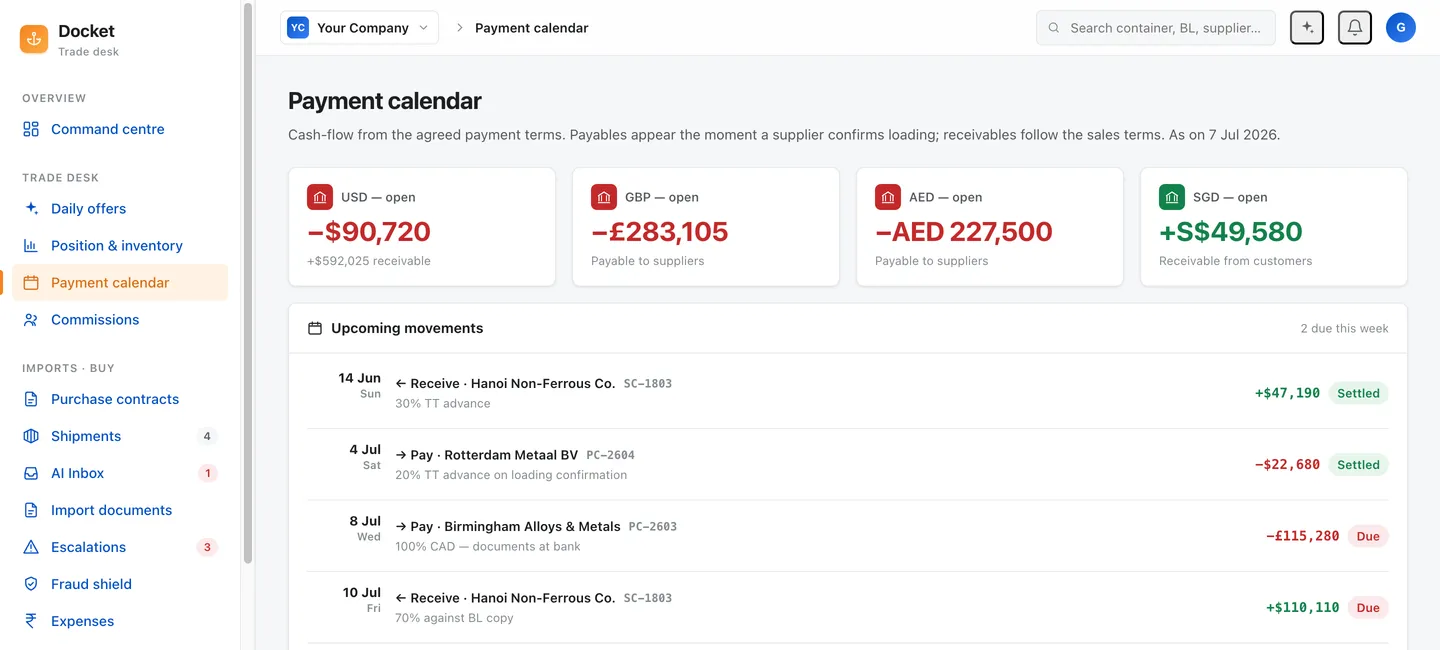
Payment calendar automation built from your contract terms
Payment calendar automation turns contract terms into dated payables and receivables without anyone rebuilding a sheet. Docket reads the purchase contract and the sales contract, derives the advance, the balance against documents, the credit period and the receivable, and keeps each currency separate instead of collapsing it at an invented rate.
Replaces: The payables spreadsheet somebody rebuilds every month · Calendar reminders keyed in by hand from each contract · The position and risk module of a CTRM, which reports a date after you enter it · Chasing a receivable by remembering to chase it
Payment calendar automation means one thing on a trading desk: the dates come out of the contract, not out of somebody’s memory. Docket reads the purchase contract and the sales contract, derives every payable and receivable those terms create, and keeps each currency in its own column. Nobody rebuilds a sheet. Nobody types a date twice.
The contract already said when the money moves. The problem is that the contract is a PDF and the calendar is a spreadsheet, and a person sits between them.
Why do payment dates go missing on a trading desk?
They do not go missing. They get re-derived, by hand, over and over.
A purchase contract states an advance against proforma and a balance against documents. A sales contract states a credit period counted from the bill of lading date. The bill of lading arrives eleven days later than planned, so the credit period moves. Somebody has to notice that, open the sheet, and shift a row. Then the forwarder revises the sailing. The row moves again.
Payment tracking runs 10 to 15 minutes per container. That looks small next to supplier follow-ups at 30 to 45 minutes and doc-pack prep at 45 to 90 minutes. It is not small at volume. The whole container consumes about 2.2 hours of desk work, and a 500-container desk burns roughly 1,100 hours a month against 1,232 hours of capacity across seven people. That desk is at about 90 per cent capacity on grunt work alone, and the payment rows are competing with everything else for the same attention.
What gets dropped is never the payable. Your supplier calls. What gets dropped is the receivable, because nobody on the other side is calling to remind you they owe you money.
What does the calendar derive?
Docket takes the terms at contract entry and holds them as live obligations that follow the shipment.
- The advance, against the proforma, on the buy side.
- The balance against documents, tied to the doc-pack Docket is already assembling.
- Letter of credit dates where an LC governs the trade, held against the shipment they belong to.
- The credit period on the sell side, counted from the document date the contract names, which means it re-dates itself when the document re-dates.
- The receivable, with its own chase schedule.
- Commission, where a contract carries one.
Each obligation carries the contract clause it came from. When a counterparty argues about a due date, the clause is on the row.
What does one contract turn into?
Take a plain import: advance against proforma, balance against documents, goods shipped against a purchase contract, sold on a credit period counted from the bill of lading date.
On a spreadsheet desk that contract produces four manual events. Somebody types the advance date. Somebody watches for the documents and types the balance date. Somebody reads the BL when it finally arrives and counts the credit period forward. Somebody remembers, or does not remember, to chase the buyer on the day it falls due.
On a Docket desk the same contract produces four dated obligations at entry, before the goods have moved. The advance sits against the proforma. The balance sits against the doc-pack Docket is already assembling and checking. The credit period is defined as a count from the document date, so the day the bill of lading lands at a different date than planned, the receivable date moves with it and the desk is told what changed and why. The chase on that receivable starts on its own.
Nobody typed a date. Nobody had to notice the BL was late in order for the calendar to stay correct.
Now do that 500 times a month, which is the reference desk, and the difference stops being a convenience.
Why keep currencies separate?
Because a converted number is an opinion, and your accounts do not run on opinions.
An import desk can hold a USD payable to a supplier, an SGD cost base for the people doing the work, and a receivable in a third currency, all against one shipment. Collapse those into a single figure at a rate somebody pulled off the internet and you have manufactured an exposure report nobody can defend at audit.
Docket shows each currency as contracted. If you want one number, you give us the rate you book at. Our own published figures follow the same rule: SGD payroll inputs stay in SGD and USD quotes stay in USD, and we say so on the data file rather than quietly converting.
How does this compare to what desks use now?
| Spreadsheet plus reminders | CTRM position module | Docket | |
|---|---|---|---|
| Where the dates come from | Typed in from the contract | Typed in from the contract | Derived from the contract on entry |
| What happens when the BL slips | Someone remembers to move the row | Someone re-enters the date | Dates re-derive with the shipment |
| Currencies | Often collapsed at a guessed rate | Converted at a rate you configure | Held separate, as contracted |
| Who chases the receivable | Whoever has time | Nobody. It reports | Docket, on email, WhatsApp, SMS, voice |
| Evidence for the due date | The contract, somewhere | A field | The clause, on the row |
| Who owns the coordination | Nobody | Nobody | Docket |
Every CTRM, ERP and trade tool on this list records the trade. None of them reaches your counterparty. That reach is the part of Docket that is hard to copy, and it is why the receivable actually gets chased.
What does the chase look like?
The escalation ladder runs on channels the counterparty already uses, so there is no portal for anyone to sign up for.
- Email, immediately.
- WhatsApp, at 24 hours.
- SMS, at 48 hours.
- An AI voice call, at 72 hours.
Supplier chasing is automated at 85 per cent, doc-pack drafting at 65 per cent, tracking and reporting at 85 per cent. Blended across all desk work that is about 70 per cent. On the 500-container reference desk, 70 per cent of 1,100 hours frees about 770 hours a month. At a loaded desk cost of about US$25 an hour, that is US$19,250 of desk time removed. Docket at that volume runs 350 shipments at $6, or US$2,100 a month. Net, about US$17,150 a month and US$205,800 a year.
Money freed minus what Docket costs. Never money freed on its own.
Those 770 hours are capacity, not chairs. The same seven people cover 1,000 to 1,200 containers instead of 500, or two or three of them move onto buying and selling, which is where the margin lives. A desk that has been at 90 per cent on grunt work for three years does not want a smaller desk. It wants its people back.
What this does not do
Docket does not touch your money. No banking credentials, no payment initiation, no access to your rails. Payment instructions go through your own approval path to your own bank, the way they do today.
Docket does not tell you what the rate should be, and it does not advise on hedging. It holds what you contracted, in the currency you contracted it in.
Docket reads email. A term agreed on a phone call and never written down is a term Docket cannot derive. Put it in the contract and the calendar follows it.
And the numbers. The per-container timings above are an operational baseline, not an industry survey. Desks differ by commodity, lane and how much the customs broker absorbs — put your own numbers into the ops cost calculator rather than taking ours.
Where the calendar sits in the rest of the desk
The two contracts are the entry point for everything Docket does. The purchase contract drives the chase. The sales contract drives the documents. Both drive the dates on this page.
Once a shipment lands, the same mailbox that produced the payment terms produces the charges, which is landed cost tracking, and every inbound message carrying a payment instruction gets screened before anyone acts on it, which is trade fraud screening. A payment calendar and a payment-diversion screen belong on the same desk for the obvious reason: the calendar tells a fraudster exactly when to send the email.
What to do with this page
Take the last contract you signed. Count how many dated obligations it creates and how many of them exist anywhere outside that PDF. Send it to us and we will show you the calendar it produces.
Two things to look for when you do it. How many of those dates depend on a document date that has not happened yet, and who on your desk would notice if that document date moved by nine days. Those two answers tell you how much of your calendar is real and how much of it is a photograph of an intention.
A contract is a schedule of payments with words wrapped around it. Your calendar should read straight off it. The rest of what that means for finance and accounts on an import desk is on its own page.
Questions traders ask
What does the payment calendar derive from a contract?
The dated obligations the contract already states. Advance against proforma, balance against documents, the credit period counted from the bill of lading date, letter of credit dates where an LC governs, the sales-side receivable and its terms, and commission where a contract carries it. Docket reads the terms once, on contract entry, and every date after that follows the shipment as it moves.
How are multiple currencies handled?
Each currency stays in its own column, shown as contracted. Docket does not collapse a USD payable and an SGD receivable into one number at a rate we picked. If you want a converted view, you supply the rate you book at, because your treasury rate is the one your accounts will be judged on. Cross-currency exposure is yours to decide on, not ours to invent.
Does Docket move money or connect to my bank?
No. Docket builds the calendar, chases the counterparty, and tells your desk what falls due and when. It does not hold banking credentials, does not initiate payments, and does not sit on your payment rails. Instructions still go to your bank through your own approval path. Docket is the desk work around the payment, not the payment.
What happens when a date slips?
Slippage is normal in trade, so the calendar moves with the shipment instead of pretending the original date holds. A late bill of lading moves the credit period that counts from it. Docket reprices the dates, flags what changed, and starts chasing on the new one through email, then WhatsApp at 24 hours, SMS at 48 and an AI voice call at 72.
Can I buy just the contract chase?
Yes. Purchase-contract chase runs as a standalone track at $2 a contract: daily loading-schedule follow-ups until the schedule is confirmed, then shipment verification and the payment calendar. Full plans are priced per shipment at $10, $8 or $6 depending on volume, and the payment calendar is included in all of them. No modules, no seats.
Can I see the calendar working before I commit to anything?
Yes. The live demo runs a real import SOP end to end, contracts in and payment dates derived, so you can walk it against a shipment of your own and see where it matches your terms and where it does not. The time figures on this page are an operational baseline rather than an industry survey, so check them against your own desk with the ops cost calculator.
Sources
- Docket operational baseline, import–export desk
- Docket product specification, escalation ladder
- Docket engineering model — projected automation rate by task
- Docket pricing, per shipment and standalone tracks