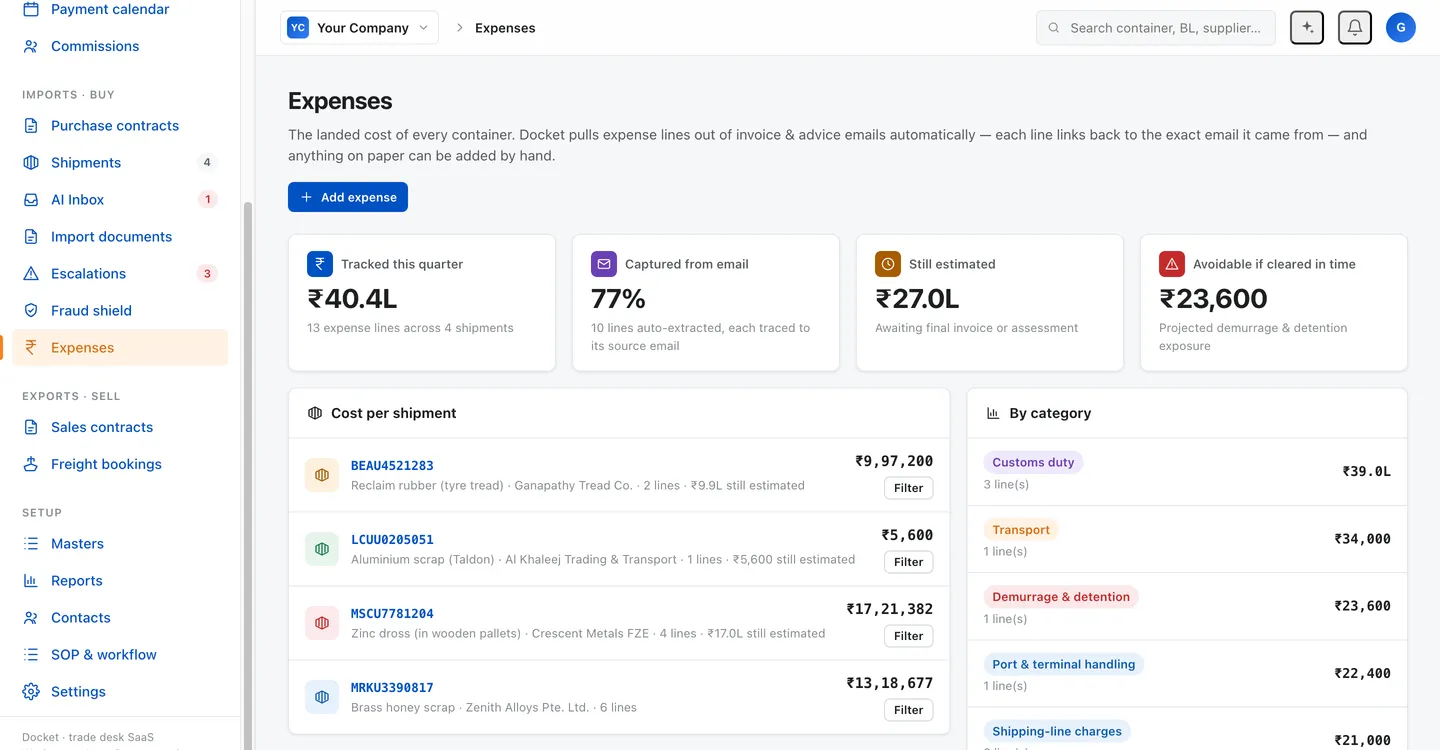
Landed cost tracking software, every expense traced to email
Landed cost tracking software adds up what a container actually cost: goods, freight, insurance, duty, broker fees, demurrage. Docket builds that number out of your mailbox, estimated from the contract on day one and actual as each invoice lands, so every line traces to its email. Per container first; your ERP allocates per SKU. Payment tracking alone runs 10 to 15 minutes per container by hand.
Replaces: The landed cost spreadsheet that gets rebuilt every shipment · The expense module of a trade ERP, which records a cost after someone types it in · Manual reconciliation of customs broker, forwarder and carrier invoices against the mailbox · Month-end accounting records that arrive after the container has already cleared
Landed cost tracking software should answer one question: what did this container cost me, and where did each number come from? Docket answers it from your mailbox. Every charge on a shipment carries the email it arrived in, with the sender, the date and the attachment attached to the line. Open the cost, see the proof.
That second half is the part most tools skip.
Why does landed cost go wrong on an import desk?
Not because anyone is careless. Because the costs do not arrive together.
The goods invoice comes from the supplier at contract time. Freight comes from the forwarder, sometimes twice, once as a quote and once as the real thing. Insurance comes from the broker. Duty comes out of the broker’s working sheet. The delivery order fee shows up on a separate note from the shipping line. Transport arrives last, often weeks after the box has been emptied.
Six or seven senders, none of whom agrees on how to name your shipment. One says the BL number. One says the invoice number. One says “your consignment”. A person on your desk reads each mail, decides which container it belongs to, and types it into a sheet.
That typing is not free. Payment tracking runs 10 to 15 minutes per container. That sits on top of supplier follow-ups at 30 to 45 minutes, doc-pack prep and checking at 45 to 90 minutes, and status tracking and reporting at 20 to 30 minutes. The whole container takes about 2.2 hours of desk work, with a range of 2 to 2.5.
Now multiply. A 500-container desk burns roughly 1,100 hours a month. Seven people at about 176 hours each gives 1,232 hours of capacity. The desk is at about 90 per cent capacity on grunt work before anyone buys or sells anything.
What does “traced to the email” mean in practice?
It means the cost line and its evidence are the same object.
Docket reads the mailbox the desk already uses. A charge lands, and Docket matches it to the shipment using what is in the mail and the attachment: the BL, the contract, the container numbers, the party names it already knows from your masters. The charge is posted against that shipment. The message stays with it.
Six months later, when a supplier says the freight was quoted lower, or an auditor asks why one container carried $600 of extra fees, nobody goes searching. The line opens, the mail is under it, the attachment is under the mail.
Here is what the difference looks like on the same charge.
| Spreadsheet plus mailbox | Trade ERP expense module | Docket | |
|---|---|---|---|
| Who spots the invoice email | A person, when they get to it | A person, when they get to it | Docket, on arrival |
| Who decides which shipment it belongs to | A person | A person | Docket, from the contract and BL it already holds |
| Who types the number | A person | A person | Nobody |
| Where the evidence lives | A shared mailbox, somewhere | A file someone attached, if they did | On the cost line |
| When the landed cost is complete | After the invoices stop arriving | After the invoices stop arriving | As the invoices arrive |
| What happens on a dispute | Search the mailbox | Search the mailbox | Open the line |
The right-hand column is the whole product argument. Every trade ERP, CTRM and document tool on the market records what already happened. Docket does the work that produces the record.
How does Docket know which shipment an invoice belongs to?
From what it already holds.
The purchase contract and the sales contract come in first on a Docket desk. That gives Docket the parties, the goods, the quantity, the incoterm, the port pair and the terms. The doc-pack adds the bill of lading number, the container and seal numbers and the invoice number. The masters carry your suppliers, your forwarders, your customs brokers and the way each of them writes your name.
So when a mail arrives from a forwarder with a subject line that says nothing useful and a PDF attached, Docket has half a dozen ways to place it. Container number in the PDF. BL number in the body. Sender matched to a forwarder already working that lane for you. Amount consistent with the quote on that shipment.
Where the match is not clean, Docket says the match is not clean and asks. A charge posted to the wrong container is worse than a charge sitting in a queue for a day, because the first one quietly corrupts two shipments and the second one costs somebody thirty seconds.
What costs are included in the landed cost?
- The goods value from the purchase contract, which Docket already has because the contract is where a shipment starts.
- Ocean freight, as invoiced by the forwarder, with the quote alongside it when a quote came first.
- Insurance, as invoiced by the broker.
- Customs duty and clearance charges from the broker’s working sheet.
- Delivery order and terminal charges from the line.
- Inland transport.
- Demurrage and detention, if the two clocks went the wrong way.
That last line is the one traders care about most, and it is the one that arrives latest. Two clocks race on every shipment: port free time against your paperwork. About 8 days of lateness is typical. A week of demurrage on one container runs about US$12,000. One missed doc-pack a month works out at US$1,000 to $2,000 an event, so US$12,000 to $24,000 a year.
When that charge is traced to the email chain that produced it, the argument with the line, the forwarder or the supplier stops being a memory contest.
How do you calculate landed cost?
Add the goods value to every cost above that is not recoverable, and divide by the units or the containers you are costing. The arithmetic is a sum; the two judgements inside it are what move the answer. The duty base is not settled internationally — the WTO Valuation Agreement leaves CIF against FOB to each member, so the same cargo carries a different duty base in Singapore and in India. And recoverable import tax does not belong in landed cost at all: GST or VAT you reclaim is cash out on a date, not a cost of the goods, and putting it in overstates every margin downstream of it.
Our landed cost calculator runs the sum with both of those as inputs rather than assumptions, and publishes no duty rate or charge tariff, because yours comes off your own classification and your own invoices. What it cannot do is collect the charge lines — which is the part of the job that is actually late.
Estimated at contract, actual as the invoices land
Every landed cost software page you will read promises the true cost of your goods. The question is when you get it.
Docket sets the expected lines the day the purchase contract is recorded. The incoterm says which charges are yours. The lane says which parties will bill them. Your own history on that lane says roughly what each will come to. Every line is marked as an estimate.
Then the mailbox does the rest. The freight invoice arrives and replaces the freight estimate. The broker’s working sheet arrives and replaces the duty estimate. The delivery order arrives with the line’s charges on it. Each replacement is a reconciliation: the actual against the estimate, with the variance visible on the container the day it lands.
A number you can price against on day one and defend line by line on day forty. Most tools give you one or the other.
Per container first, then per SKU
A landed cost tracking system for an import desk and a landed cost module inside an inventory ERP answer different questions, and the ERP’s question comes second.
The ERP asks what each unit on the container is now worth, so it can value the stock and report the margin per product. To answer it, the ERP spreads the container’s charges across the SKUs on it: by value, by quantity, by weight, by volume, on a rule you choose. That is allocation, and the ERP is the right place for it.
Allocation needs a complete, correct container total to start from. That is the part the ERP cannot produce, because the charges arrive by email from six parties over six weeks and somebody has to find, match and check each one. Docket does that part and hands across the traced total. Per container in Docket, per SKU in your ERP, and the evidence stays attached through both.
How much desk time does this give back?
Be careful with the arithmetic here, because two different rates are in play and mixing them overstates the case.
Docket automates supplier chasing at 85 per cent, doc-pack drafting at 65 per cent, and tracking and reporting at 85 per cent. Blended across all desk work that is about 70 per cent. On the 500-container reference desk, 70 per cent of 1,100 hours is roughly 770 hours a month freed. At a loaded Singapore desk cost of about US$25 an hour, that is US$19,250 of desk time removed. Docket at that volume costs 350 shipments times $6, or US$2,100 a month. Net, about US$17,150 a month and US$205,800 a year.
Money freed minus what Docket costs. That is the only formula on this page.
Read the 770 hours as capacity, not as people. The same seven people handle 1,000 to 1,200 containers instead of 500, or two or three of them move to buying and selling, which is the work that actually makes money. A trading desk grows into freed hours. It does not celebrate an empty chair.
Your desk is leaving ~US$200k/year on the table just to manually type what Docket learns in a month.
What this does not do
Docket reads email. If a charge never arrives by email, and somebody hands over a paper note at the port, Docket will not know about it until that note reaches the mailbox.
Docket does not convert currencies at a rate we invent. Charges stay in the currency they were invoiced in. If you want one number in one currency, you give us the rate you book at.
Docket is not your accounting system. It produces accounting-ready expense records with their evidence attached, and your accountant still runs the ledger.
And the honest one about the numbers. The figures above are an operational baseline, not an industry survey, and the automation rates are what Docket is built to hit rather than a per-customer average. Ask us for a number we do not have and we will say so rather than estimate it — that rule is why the free-time tables on this site are still blank.
Where the landed cost fits with everything else
The purchase contract and the sales contract are where a shipment starts on a Docket desk. Recording them is the first thing a trader does, and every chase, every check, every payment date and every cost line derives from them. Landed cost is what those two contracts look like once the shipment is over.
The same mailbox that produces your costs also produces the payment calendar, because contract terms name the dates. And the same inbound screening that reads a broker’s invoice reads the mail that claims your supplier’s bank account has changed. That is trade fraud screening, and it is running on every message before the cost line is ever written.
What to do with this page
If you run an import desk and you cannot open last quarter’s worst container and see, in one screen, every charge and the mail it came from, that is the gap. Send us the shipment you argued about most last quarter. We will show you what it looks like traced.
Cost per container is not an accounting question. It is the question of whether the trade made money, and you should be able to answer it before the invoices stop arriving.
Questions traders ask
What is landed cost tracking software?
Software that collects every charge a shipment picks up and keeps the total per container as the charges arrive, rather than assembling it at month end. That means the goods value, freight, insurance, duty, broker fees, delivery order charges, transport and any demurrage, each attached to the shipment with the document it came from. Landed cost tracking software is judged on one thing: whether the number is available while you can still act on it, and whether every line in it can be traced back to the email that carried it.
Is Docket a landed cost tracker?
Yes, with one difference that decides whether the number is trustworthy. A landed cost tracker is usually a spreadsheet: a row per container, a column per charge, and a person who types each figure in once the invoice turns up. The columns are normally right. What a typed tracker cannot do is notice that a charge has not arrived yet, that a rate changed this year, or that a fee with a floor and a ceiling is not a straight percentage of the value. Docket keeps the same per-container record and builds it from the mailbox instead, so every line carries the email it came from and a missing line shows as missing rather than as zero.
What software calculates and tracks landed costs down to the individual item level?
Two different jobs sit inside that question and most tools do only one. Collecting the charges is per container: freight, duty, broker fees, demurrage and the delivery order all arrive as one invoice for one box, and nothing on any of them names a SKU. Allocating them is per item, and it needs a rule — by value, by weight, by volume or by unit — which changes the answer for every line in a mixed container. Docket does the first job: it collects each charge from the mailbox and keeps the per-container total with the email it came from, while the per-SKU split belongs in the ERP or inventory system that holds your item master, fed from a total that is complete. A tool that offers an item-level landed cost from a container-level invoice has picked an allocation rule for you, and the rule is the part a buyer should choose.
Are there tools for calculating landed costs and COGS in real time?
For landed cost, yes, and real time here means as each charge arrives rather than at month end: the contract sets the expected lines on day one and every invoice that lands by email replaces an estimate with an actual, so the container total is current all the way through the shipment. COGS is a different number and it belongs in your ledger, not here. Cost of goods sold needs the landed cost allocated across the SKUs on the container and matched to what you actually sold in the period, which is accounting work your ERP does well. What it cannot do is find the forwarder's invoice in a thread or notice that the delivery order fee has not arrived yet. Docket produces the traced container total in real time; your ERP turns it into COGS.
What is landed cost, exactly?
Landed cost is what one container cost you by the time it sits in your yard. Goods value, ocean freight, insurance, customs duty, customs broker charges, delivery order fees, transport, and any demurrage or detention the shipment picked up on the way. It is the only number that tells you whether the trade made money. Most desks compute it late, after the invoices stop arriving.
How is this different from a trade ERP's expense module?
A trade ERP holds the number once a person types it in. Somebody still opens the broker's invoice, reads it, decides which shipment it belongs to, and keys it. Docket reads the mailbox first and attaches the charge to the shipment itself, with the source email kept alongside. The ERP records the answer. Docket does the work that produces the answer.
Can I see where a number came from six months later?
Yes. That is the point of tracing every expense to its email. Each line on the landed cost carries the message it arrived in, the sender, the date and the attachment. When a supplier disputes a charge or an auditor asks why a container cost what it cost, you open the line and the evidence is under it. No hunting through a shared mailbox.
Does Docket handle charges that arrive in different currencies?
Docket keeps each currency separate and shows it as invoiced. It does not convert your freight invoice at a rate somebody made up. If you want a single-currency view you supply the rate you book at, because the rate that matters for your accounts is your rate, not a mid-market number pulled off the internet.
What does it cost to run?
Docket is priced per shipment, not per seat: $10 a shipment on Starter, $8 on Growth, $6 on Trade Desk at 300 or more shipments a month. A shipment bills at most two containers, so big consignments do not cost extra. Expense tracking is included in every plan. There are no modules to buy. Setup starts at $1,500.
Is this a landed cost tracking system or an accounting module?
A tracking system for the import desk, not a costing module inside the ledger. The landed cost software built into inventory and accounting ERPs works from the moment a person keys a charge in; its job is to spread that charge across SKUs and value the stock. Docket works before that moment. It collects the charges from the six parties who email them, matches each to the container with the evidence attached, and hands the ERP a complete, traced container total to allocate. The two sit in sequence, not in competition.
Does it allocate landed cost per SKU, by weight, value or quantity?
No. Allocation across the SKUs on a container is your ERP's job and it is good at it: by value, by quantity, by weight, by volume, on a rule you set. What the ERP cannot do is find the freight invoice in the forwarder's thread, notice the broker's bill has a reimbursement line that was already invoiced, or tell you the DO fee has not arrived yet. Docket does that part, and passes across a container total where every line is already matched and evidenced.
Does it show estimated versus actual landed cost?
Yes, per line. The purchase contract and the incoterm set the expected lines the day the deal is recorded, and each line stays marked as an estimate until the invoice for it arrives by email and replaces it. So the landed cost is a decision number on day one and a reconciled number when the last charge lands, with the gap visible in between. A forwarder invoice that comes in above the quote is a variance you see on the container, not a surprise at month end. That is the difference between this and estimate tracking software in the general sense: the point is not storing the estimate, it is that a line nobody has invoiced yet reads as outstanding rather than as zero.
Does Docket calculate customs duty?
No. Duty rates are jurisdiction-specific, change on notification, and the only correct source is the tariff schedule your customs broker files against. Docket holds the HS classification you and your broker agreed, flags a consignment that departs from it, and records the duty as assessed on the customs declaration and the broker's working sheet. A duty figure a machine estimated is a figure a customs officer will disagree with.
How does the landed cost get into my accounts?
As accounting-ready expense records with the evidence attached: the charge, the party, the invoice reference, the date, the currency as invoiced, and the email it arrived in. Your accountant runs the ledger. On the Enterprise plan Docket integrates with SAP, QuickBooks and Xero, so the traced container total lands in the books without retyping; other ERPs are scoped per customer.
Is this shipping cost management software?
It depends which half of the phrase you mean. Software sold as shipping cost management, or as freight cost management software, usually manages the rate before the booking: quotes from several carriers, a contract rate table, a freight spend report by lane. Docket works after the booking, on what the shipment actually cost — freight, insurance, duty, broker fees, delivery order charges, transport and any demurrage, each traced to the email it arrived in. If you want to negotiate next quarter's rate, that is a procurement tool. If you want to know what this container cost and be able to prove every line of it, that is this.
Is this shipping cost dispute software?
It is the record a dispute turns on, and it is not the dispute. There is no product that argues a charge for you: what decides a shipping cost dispute is whether you can show which day the pack was complete, which party sat on which document, and what the custodian's own published tariff said at the time. Docket keeps all three per shipment — every charge with the email it arrived in, every chase with its date, the tariff edition the deadline was derived from — so the argument starts from a dated record rather than from a search through a shared mailbox. Filing the claim, and deciding whether it is worth filing, stays with you and your broker.
Is a cost tracking system the same as an accounting system?
No, and they are better in sequence. A cost tracking system collects the charges as they arrive from the six parties who send them and attaches each one to the shipment with its evidence. An accounting system posts what it is given. The gap between them is where the work is: noticing that the broker's bill contains a line already invoiced by the forwarder, or that the delivery order fee has not arrived yet. Docket closes that gap and hands the ledger a complete container total.
What does landed-cost tracking cost?
It is not priced separately. Landed cost is part of every plan, billed per shipment: $10 up to 50 a month, $8 from 51 to 300, $6 above 300, with a shipment billing at most two containers. There are no modules and no per-seat pricing, so the expense tracking is not an upgrade you buy later.
Sources
- Docket operational baseline, import–export desk
- Docket engineering model — projected automation rate by task
- Docket pricing, per shipment
- CPF Board employer contribution rate and Ordinary Wage ceiling schedule
- WTO Agreement on Implementation of Article VII of GATT 1994 (Customs Valuation Agreement), Article 8.2 — whether transport, loading and handling charges and insurance are included in the customs value is left to each member, which is why the duty base differs between importing countries for identical cargo