Replacing Excel for import tracking: what actually works
Excel does not break because it is Excel. It breaks when the number of open shipments passes what one person can hold in their head, because a spreadsheet records status and cannot go and get it. Tracking and reporting alone costs 20–30 minutes per container. Replace the chasing first, and the file second.
The best-run file in most import businesses is a spreadsheet called something like Shipment Tracker 2026 v4 FINAL. It has thirty-one columns, conditional formatting on the free-time column, a filter that only one person knows how to reset, and it is correct.
It is correct because Priya updates it. Every morning, between 9 and 10, before anything else.
The file is not the problem. The hour is.
When does Excel stop working for import tracking?
Not at a volume. At a behaviour. Three signals, and none of them is the row count.
Two people need the same row in the same hour. The moment the file is on a shared drive and two people edit it, you are running a database with no locking and a version convention held together by a filename.
The status column is copied, not derived. Somebody read an email, decided what it meant, and typed a word into a cell. That word is now the truth of your business, and the email it came from is in an inbox nobody else can see.
The desk slows down when one person takes leave. This is the loudest signal and the one most desks explain away. If the tracker is only correct because a specific human keeps it correct, the tracker is that human’s memory with borders drawn on it.
A spreadsheet is a very good place to keep the answer. It is not able to go and get the answer. That distinction is the whole subject of this post.
What is the tracking costing?
Container by container, the work breaks down like this.
| Task | Time per container |
|---|---|
| Supplier follow-ups | 30–45 min |
| Export doc-pack prep and checking | 45–90 min |
| Status tracking and reporting | 20–30 min |
| Payment tracking | 10–15 min |
Status tracking and reporting: 20 to 30 minutes a container. Add payment tracking and you are at 30 to 45 minutes per box on work whose entire output is a cell containing a word.
Five hundred containers a month is roughly 1,100 hours of desk work in total. A seven-person desk provides 1,232 hours at 176 hours a head. About ninety percent of the team goes to grunt work before anyone buys or sells anything.
Priya’s hour between 9 and 10 is not one hour. Multiplied across the desk and the month, tracking alone runs into the low hundreds of hours.
And the work inside that hour is worse than it looks. It is opening four carrier sites because you use four carriers. It is checking a terminal page that renders badly on a phone. It is a message to the CHA asking whether the Bill of Entry went in. It is three internal people asking the same status question in three channels before lunch.
Why does replacing the spreadsheet not fix it?
Because most replacements replace the file.
| What you buy | What it fixes | What it leaves |
|---|---|---|
| A trade ERP | Contracts, inventory, landed cost, accounting-ready records | Somebody still emails the supplier |
| Documentation software | Drafting invoices, packing lists, certificates from masters | Somebody still chases the missing input |
| A tracking portal | Milestones and free-time countdowns in one screen | Somebody still asks the CHA what is happening |
| Position and risk tools | Open positions, payment calendar, commissions | Somebody still confirms the payment landed |
| A shared spreadsheet, done properly | Version conflicts | Everything above |
Every row in that table is a genuine improvement over a spreadsheet, and every row leaves the same sentence in the right-hand column. Somebody still has to go and ask.
That sentence is the job. Trade runs on chasing, not on recording. Six parties touch one container. The supplier, the customs broker, the bank, the forwarder, the insurer and you. Every tool in that table sits inside your four walls and waits for the other five parties to send something in.
So the desk keeps the spreadsheet. Not out of nostalgia. Because the spreadsheet is where the chasing gets planned, and the new system has nowhere to put that.
What should the replacement do?
Four things, in this order of importance.
1/ Derive status instead of storing it. If a milestone is typed by a person, it is an opinion with a timestamp. If it is derived from a carrier feed, a document arriving or a payment clearing, it is a fact. Anything typed should be the exception, and the exception should be visible as one.
2/ Own the follow-up, with a timer. Not a reminder that pings a human. The system sends the ask itself: email, then WhatsApp at 24 hours, then SMS at 48, then a call. A reminder just moves the work from the spreadsheet to a notification.
3/ Count the free time backwards from discharge. The date that matters is not vessel arrival. It is discharge, minus free time, minus a margin. If your tool cannot compute that date, it is a calendar with a logo. This is the whole of detention and demurrage management that a spreadsheet cannot do: a cell holds the date, it does not act on it.
4/ Keep the audit trail attached to the shipment. Every email, every amendment, every expense, on the shipment. The single most useful thing a good spreadsheet does is put everything about one box in one row. Do not lose that. The cost columns are the ones that decay fastest, because each charge arrives from a different party weeks apart — which is the case for shipping cost management software that collects the charge and the email it came in, rather than a cell somebody retypes at month end.
Now the thing to keep. Keep the columns. A tracker a desk has evolved over five years is the best written specification of that desk you will ever get. When we map a new SOP, the spreadsheet is the first artefact we ask for, ahead of any process document, because the process document says what the desk intends and the spreadsheet says what it does.
What if I am keeping the spreadsheet this year?
Fair. Budgets exist and a migration in peak season is a bad trade. Five changes cost nothing and recover a real share of Priya’s hour.
1/ Split the one status column into two: what happened, and what we are waiting for. A single status column collapses a fact and a plan into one word, and the plan is the part that runs out of time.
2/ Add an owner column with a person’s name in every populated row. Not a team. Blank owners are the shipments that go to demurrage.
3/ Add a next-chase-date column and sort the file by it. That one column turns a register into a work queue, which is what the desk needs at 9am.
4/ Compute the deadline, do not type it. Discharge date minus free time minus two days, as a formula. A typed date is a memory. A formula is a rule.
5/ Move the file to a place with version history and stop emailing copies. Every emailed copy is a second truth with a timestamp.
Do these five and you will still have a spreadsheet that cannot go and ask anyone anything. You will have one that tells you, in sorted order, who to ask. That is most of the value of the first upgrade, for the price of an afternoon.
How do I move without breaking the month?
Run both for one cycle. That is it. That is the migration plan.
Pick the twenty shipments in flight. Put them in the new system and keep updating the spreadsheet exactly as before. At the end of the cycle, compare the two on three questions. Which one was right more often. Which one was updated without a human. Which one told you about a problem before someone escalated it.
If the new system loses on all three, keep the spreadsheet and you have lost a month. If it wins on the second question alone, you have your answer, because that is the question that gives Priya her hour back.
Do not migrate history in the first pass. Historical shipments are done. Their value is reporting, and reporting can wait a quarter.
The gap in this post
The timings here are an operational baseline, not a survey. Twenty to thirty minutes of status tracking a container is what the work costs on a desk of this shape; yours will sit either side of it depending on how many carrier portals you are checking and how much your forwarder pushes to you unasked.
The tipping point is the part worth arguing with. It is not a container count, it is the number of open shipments one person can hold in their head, and that varies by person.
The tool categories in the table above are described by what they do, not by vendor. Judge any specific product by the right-hand column and check it yourself before you sign.
One column in that tracker deserves its own argument, because the tariff behind it is not a number: what a demurrage spreadsheet cannot hold, read out of five published terminal tariffs.
The cost columns have the same problem one level down. A landed cost tracker holding one percentage per charge is wrong on the two US federal fees that ride on an entry summary — one of them is clamped at both ends and re-indexed every year, the other depends on which port the box crossed. Which fee lines a percentage gets wrong, out of the regulations that set them.
Where Docket fits
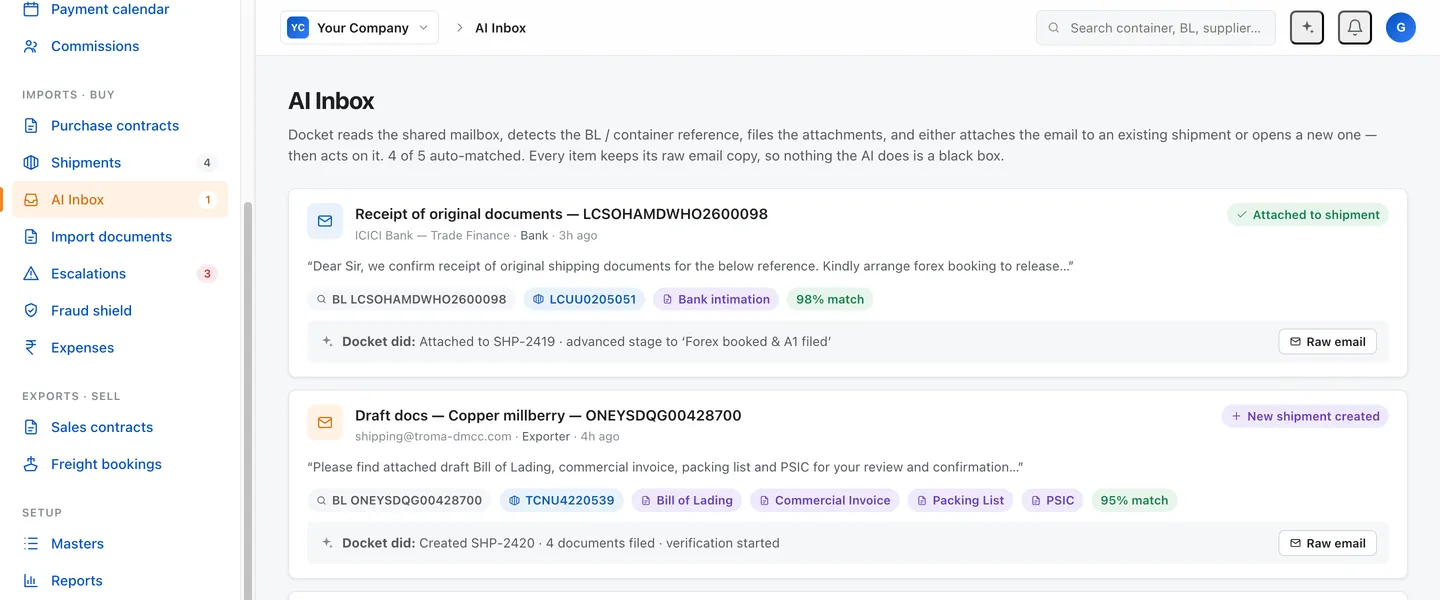
Docket is built the other way round from the table above. It starts at the chase and works back to the record. Contracts go in, deadlines come out, and the system goes and gets the answer on email, WhatsApp, SMS and an AI voice call, on channels your counterparties already use, with no portal for anyone to sign up for. The tracking falls out of the chasing. Not the other way round. Docket is built to handle about 85% of tracking and reporting without a person.
Priya keeps her judgement. What leaves her is the hour between 9 and 10.
Open your tracker and look at the status column. Ask how many of those cells a human typed this week. That number is the size of the problem, and no spreadsheet ever told anyone where a container was. Priya did.
Questions this raises
When should an import desk stop tracking shipments in Excel?
When more than one person needs to update the same file in the same hour, when the status column is copied from an email instead of derived, or when the person who owns the file goes on leave and the desk slows down. Volume is a weaker signal than any of those three.
Is a trade ERP the right replacement for a shipment tracker?
It replaces the file and not the work. An ERP holds contracts, inventory and landed cost properly, and it still waits for a human to go and ask the supplier where the packing list is. If your bottleneck is chasing and not recording, an ERP will not move it.
How much time does status tracking take per container?
Twenty to thirty minutes a container, covering carrier-site checks, updating the file and answering internal status questions. Across 500 containers a month that is a meaningful share of a seven-person team.
What should I keep from the spreadsheet?
The column list. A tracker that a desk has evolved over five years is a specification for how that desk works. Take the columns into whatever replaces it, and be suspicious of any tool that cannot hold them.
Can tracking be automated?
Most of it. Docket is built to handle about 85% of tracking and reporting without a person, because milestones, free-time countdowns and status updates are derived, not decided. The share that stays human is the exception handling, which is where the value is anyway.
Sources
- Docket operational baseline, import–export desk · checked 2026-08-08
- Docket engineering model — projected automation rate by task · checked 2026-08-08